I’ve realized that fixing the tempo in the “tedious way” isn’t really working because I can only get close to a steady beat when I record sounds or software instruments but I’m not a robot and fixing every individual note still doesn’t make the music sound even. So, I looked up some YouTube tutorials and it turns out using “Smart Tempo” is indeed the solution. It is quite a complicated tool and I’m not sure I have the experience to use it but I’m deep enough in this process so might as well give it a go.
After quite a long time I did manage to use it and it almost matched the tempo perfectly (there is a brief section in which it speeds up and slows down for no apparent reason but it’s not that noticeable). After that, I pretty much had to re-record all the tracks and sounds I had made but having the tempo matched with Logic just makes everything 100 times more easy.
I still have a long way to go in order to get it to a decent level (and still two more scenes to go) but this tool will save me a bunch of time in the future.
I also learned how to import sections of other Logic X projects into the current one so I have reused some of the percussive sounds I created for the past scene so that this one doesn’t sound too artificial.
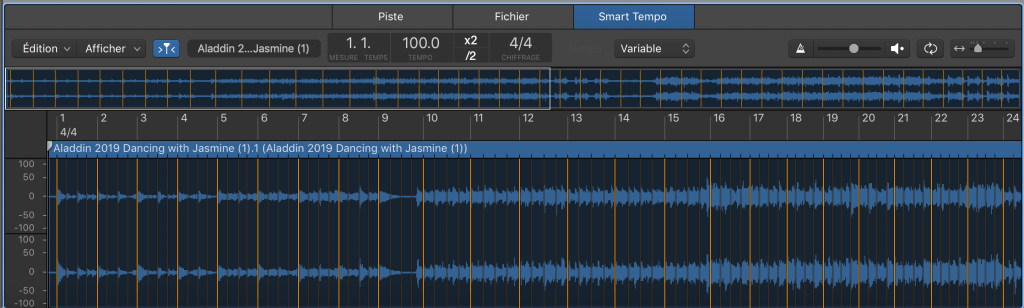
This is what smart tempo looks like. You can adjust the orange lines to fix sections of the tempo in case Logic got something wrong. It’s been a big challenge but I’m glad I took the time to learn (roughly) how to use it. Thanks to this I can finally get started on the other version for the dance scene. Because I want to do something really different, I am planning to use electronic music. I feel that the whole Arabic theme will contrast perfectly with this genre so I’m excited to get started very soon.
 Melissa's Blog